
Forums › Forums › Search & Filter Pro › Searchfilter based on ParentCategory
Tagged: filter, parentcategory
- This topic has 5 replies, 2 voices, and was last updated 10 years, 9 months ago by
Ross.
-
Anonymous(Private) January 10, 2016 at 7:11 pm #33805
Hi, how can i make a Filter based on a Setted category-id?
In the [Tags, Categories & Taxonomies]Tab i set a category id, so this works fine and shows me only the results based on my setted id. And now?
Did the filteroptions has to be childelements fromt the setted-id ? If yes, i can do that, but then?
How i have to setup the “Search Form UI” ?
regards
Ross Moderator(Private) January 11, 2016 at 12:47 am #33813Hi Katalin
I’m struggling to figure out exactly what you are trying to achieve.
Are you trying to include a category via the [Tags, Categories & Taxonomies] tab, and also want the children of this category to be automatically included?
If you can elaborate a bit more that would help.
Thanks
Anonymous(Private) January 11, 2016 at 5:38 pm #33913Hi,
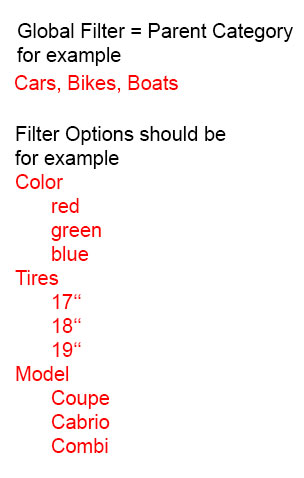
we want in the first step use a ‘global filter’ for the search. This means that the following search should only use products which match the ‘global filter’ which is a parent category in our system (please see the image with an example).
We already tried to solve this problem about the post meta action (post_category (char) equals to ‘parent category’) but it didn’t work. And we don’t know why not.
All the best
KatyRoss Moderator(Private) January 13, 2016 at 11:23 am #34106Hi Katy
Apologies if I’m not being too smart here but unfortunately I’m still having trouble following exactly what you need.
So, am I right in thinking, if you change the global category, then the other filters should also update to show only available options?
Thanks
Anonymous(Private) January 13, 2016 at 12:11 pm #34119Hi Ross,
I’ll try again…
We will provide a search in whole Germany. To get the best results in the first step customer should choose they preferred region (=parent category) and then search in the particular region by using the filters.
So there will be a search-site for each region separately. For these sites we need to restrict the elements for search to elements from the particular region. Once the customer choose a region, the elements from other regions should be definitely excluded for the search.
This is why I called it ‘global filter’ for the search. So it is not enough to exclude the not preferred region as category, we have to exclude all elements from other regions. For this reason we thought that using post meta would be the solution form our problem.
I hope, now it clear what we want…
Best regards
KatyRoss Moderator(Private) January 13, 2016 at 4:42 pm #34156Ah yes
So as I mentioned above, I guess you could create 1 search form for each region/language.
Then based on a “parent” category, the other filters would show appropriate options.
So like on this demo –
demo.designsandcode.com/sfpro-movie-reviews/search/
When you change certificate to PG 13, you will notice some of the genres become hidden and the count number (
(2)) update.To enable this kind of functionality you owuld just need to enable the option “auto count” which can be found in the general tab of your search form.
Then in each field, you would need to enable “hide empty”.
I hope I understood you this time! :/
Thanks
-
AuthorPosts

